 There are two types of Amazon selling accounts. One is called an individual, or “Sell your Stuff” account and the other is referred to as a “Sell Professionally” account. The Individual account is meant for smaller sellers with only a few items to offer; and the Sell Professionally account (aka Pro Merchant) is meant for experienced and volume sellers.
Differences between Individual and Professional Seller plans
When you create your first listing and register to sell on Amazon.com, you are automatically subscribed to the Individual selling plan. You can change your selling plan in the Settings area of your account at any time.
Individual sellers are on a pay-as-you-go system and have the use of a basic set of tools for listing and order management. Professional Sellers pay a monthly subscription fee of $39.99, and they receive a waiver of the $0.99 fixed closing fee for each order. They can also access additional tools for listing inventory and managing orders.
The table below illustrates these differences between the two Amazon Seller accounts:
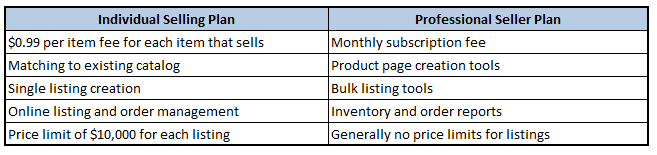
If you are thinking of it strictly from a financial standpoint, you will want to sign up for the Sell Professionally account when you are selling 40 items per month or more because the individual account costs an extra ninety-nine cents on every item you sell. The Sell Professionally account is $39.99 per month with no $0.99 fee per item. So at 40 items per month you break even and anything more than that you will save money.
However, it is not only about the bottom line financially. As you can see from the table above, there are other benefits to a Sell Professionally account.
Benefits of the Sell Professionally account:
Create Product Pages – In my opinion this is the largest benefit. Professional Amazon Sellers can create a new page in the Amazon catalog. If you want to sell a product that is not in that catalog, you will need this type of account to list it. Here is a link to the information about Creating an Amazon Product Page.
Discounted Selling – The $0.99 per sale fixed closing fee is waived for every listing sold after you become a Professional Seller. Pro sellers pay only the remaining 6 to 20 percent commission and the variable closing fee, plus a monthly subscription fee of $39.99. Here is a link to information about the Amazon Fees.
Volume Listing and Order Management Tools – As an Amazon Professional Seller, you will have access to a suite of tools for listing and managing dozens–even thousands–of listings at once. Amazon reports will allow you to download your data to spreadsheets and help you keep on top of orders, inventory, and active listings. Here are links to Examples of volume listing tools, inventory reports and order reports
Eligibility for Featured Merchant status – As an Amazon Professional Seller you will also be eligible to compete for the Buy Box placement on Amazon.com product detail pages. For many sellers, this placement will lead to greatly increased product sales. This link will better explain. How the Amazon Buy Box works
Unlimited Marketplace Selling – When you are a Professional Amazon seller you are welcome to maintain an unlimited number of product listings on Amazon.com. Your listings will remain on Amazon.com until they are sold or cancelled by you.
Overall, my recommendation is to choose the Sell Professionally account if you intend to make this even a part time business, and the individual account if you are only intending to sell off a few items from around the house occasionally.
So now you have all the facts to choose WHICH type of seller account you need and you are ready to launch your business.